
Prerequisites
Feedyio app installed on your Shopify store
An Árukereső account with an active Trusted Shop certification
Your Árukereső Public API key
Step 1: Open the Theme Editor
In your Shopify admin, go to Online Store → Themes
Click Customize on your active theme
Step 2: Add the Árukereső Trusted Badge Block
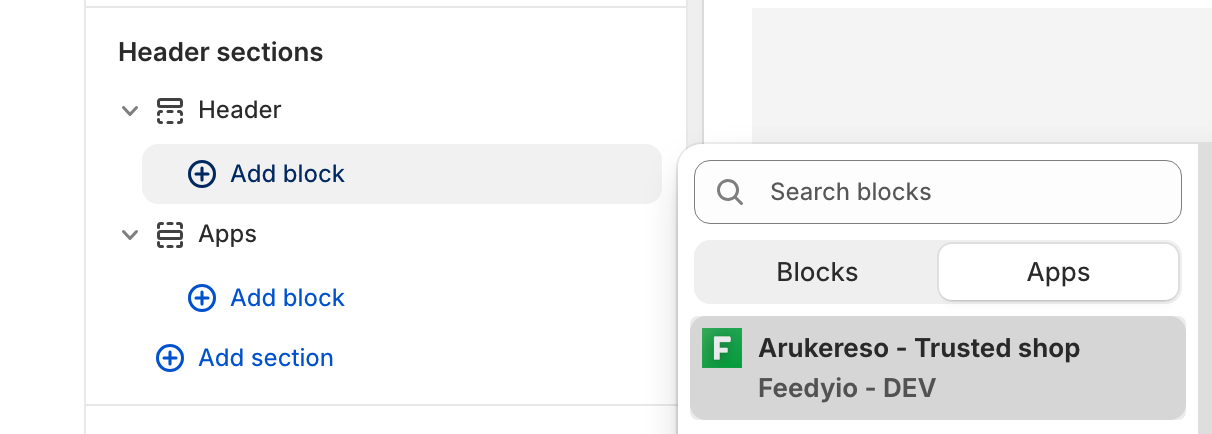
In the Theme Editor, locate the Header or Footer section in the left sidebar
Click Add block (or Add app block)
From the list of available app blocks, select Árukereső Trusted Badge
Step 3: Configure the Badge
In the block settings panel, paste your Árukereső Public API key
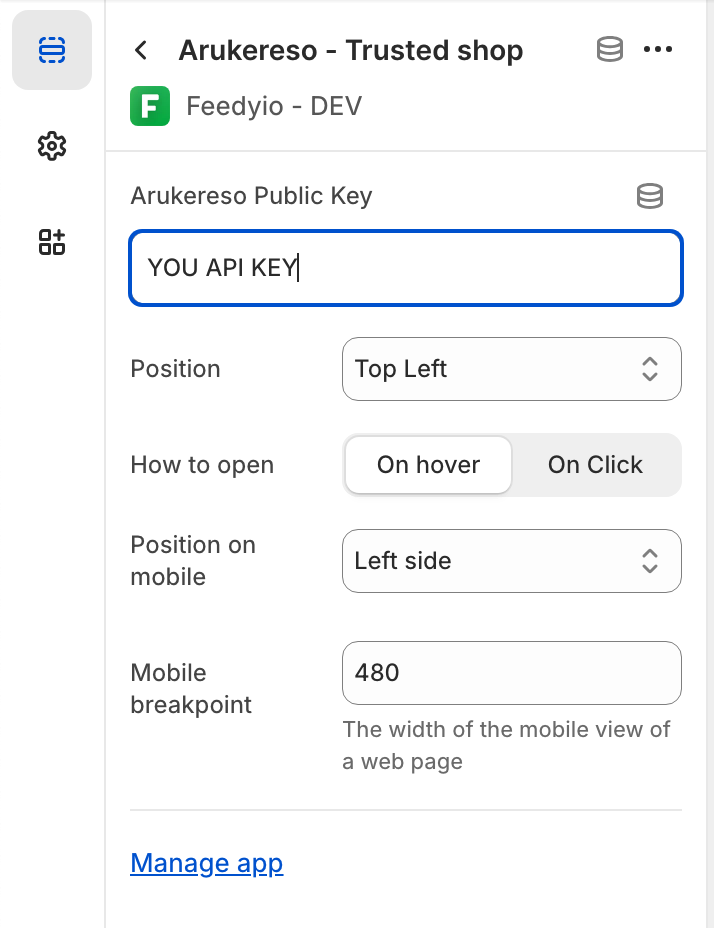
To find your Public API key, go to your Árukereső account settings
Step 4: Save
Click Save in the top right corner of the Theme Editor. The Árukereső Trusted Badge will now appear on your homepage.
Troubleshooting
Badge not showing? Make sure your Public API key is correct and that your Trusted Shop certification is active in Árukereső.
Can't find the app block? Ensure the Feedyio app is installed and up to date. Try refreshing the Theme Editor.