If you sell products in quantities or measurements, then you might need to display the price per unit for certain products. When you enter a unit price for a product, the unit price is displayed in the product feed by default for predefined feed.
From your Shopify admin, go to Products.
Click the product that you want to edit.
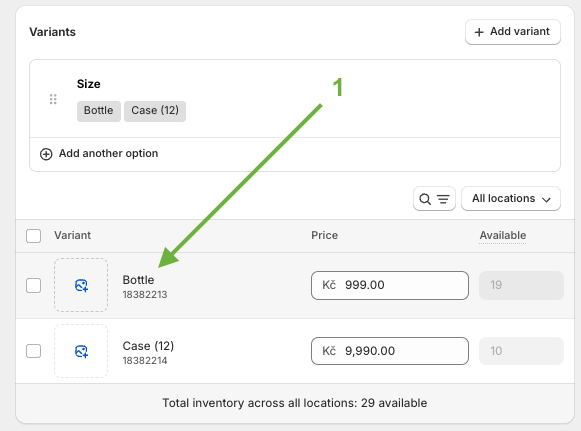
Optional: If your product has variants, then in the Variants section, click the variant that you want to edit.
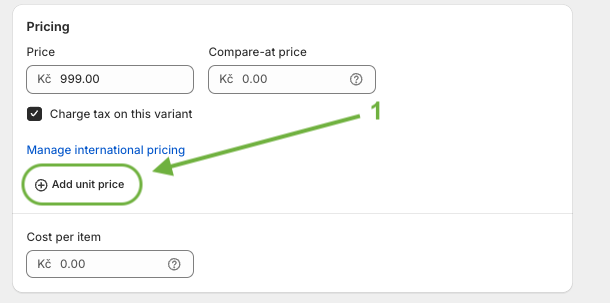
In the Pricing section, select Add unit price
In the Total product measurement field, enter in your product's total measurement, and then select the unit of measurement.
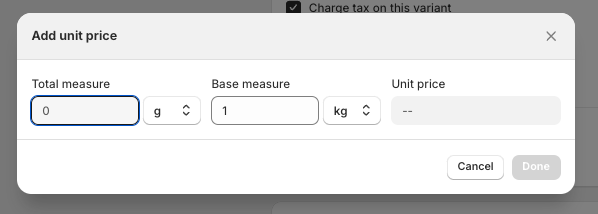
Optional: If you want to change the default base measure, then in the Base measure field, add your new base measure, and then select a unit of measurement. For example, for a product weighing 200 g, you might select a base unit of 1 kg.
Click Save.
For predefined feeds, the base prices are automatically set directly within the feed. Adjustments to the base price can be made through the additional fields.
You can add the base price using Liquid by utilizing the following variables:
Show unit price
#{{ variant.unit_price }}
result: 19.99
Show full base price
#{{ variant.base_price_reference_quantity }}
result: €19.99 / 100 kg
Amount of the basic quantity (The measure and dimension of product as it is sold)
#{{ variant.base_price_quantity }}
result: 1500
Unit of the basic quantity
#{{ variant.base_price_unit }}
result: g
Amount and Unit of the basic quantity
#{{ variant.base_price_quantity_unit }}
result: 1500 g
Reference Price Quantity
#{{ variant.base_price_reference_quantity }}
result: 100
Reference Price Unit
#{{ variant.base_price_reference_unit }}
result: g
Reference Price Quantity + Unit
#{{ variant.base_price_reference_quantity_unit }}
result: 100 gIn the CSV feed, you can use Liquid code, or you can find individual variants in Shopify values.